


Payments
On the TAPP website.
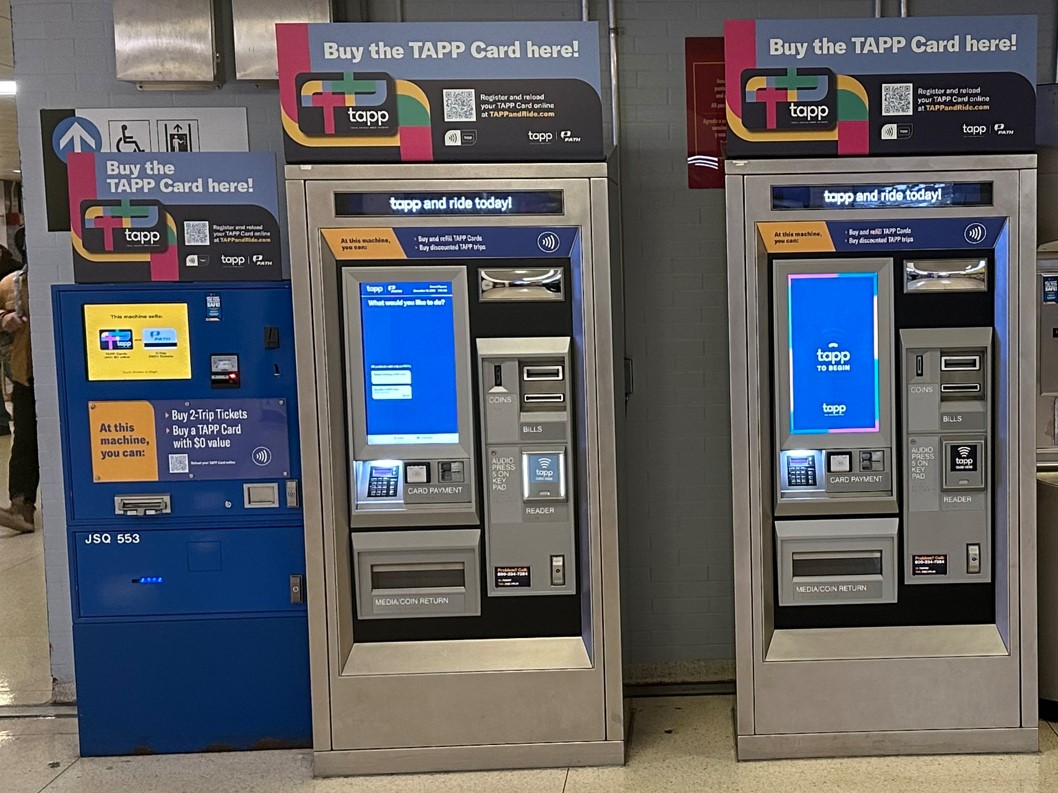
At blue dispensers located in all PATH stations (see photo below)
At TAPP Vending Machines (see photo below)
By contacting TAPP Customer Service
There is a one-time fee of $5.00 when purchasing a new TAPP Card.
This fee will be converted to stored value when linking the TAPP Card to a TAPP Account.
If you have a TAPP Account, you can see trip and charge history for all your registered cards:
- On the TAPP website
- At any TAPP Ticket Vending Machine
- By calling 1-800-234-PATH (7284) and selecting the TAPP option
You can also contact TAPP Customer Service if you have questions.
Contactless debit, credit, or reloadable prepaid cards issued on the Visa®, Mastercard®, American Express®, Discover®, UnionPay, and JCB networks are accepted.
Apple Pay®, Google Pay™ and Samsung Pay® digital wallets as supported by your smart phone, smart watch, or wearable device.
It's a card you tap on a reader instead of swiping or inserting to pay. Look for the signal-like symbol (four curved lines) on your card — that means it supports tap-to-pay.
If your credit or debit card has this symbol  on the front or back, it is contactless and can be used to pay your fare using TAPP on PATH.
No. While TAPP accepts these payment methods, you can also purchase a physical TAPP Card or a TAPP paper ticket to pay your fare.
SmartLink and MetroCard acceptance ended on August 31, 2026. SmartLink and MetroCard are no longer accepted on PATH.
Yes. With TAPP, you can use your own contactless debit, credit, or reloadable prepaid card. You can also use a smart device that works with a digital wallet.
Important: If you pay with a digital wallet, your card number may not show up in your TAPP account. Instead, you may see a different number — called a DPAN (device primary account number) or virtual account number. If you see a card number in your TAPP account that you don't recognize, it's probably your DPAN or virtual account number, not a sign of a problem.
Sign in to your TAPP account and select Travel Cards, then follow the prompts to add a payment method.
If your contactless debit, credit, or prepaid card or digital wallet enabled smart device registered to your TAPP account is lost or stolen, you can deactivate or suspend the card from your account online.
You can suspend or reactivate a payment method at any time by logging into your TAPP account. In your TAPP account wallet, you can see all payment methods associated with your account. Use the Manage function to suspend or reactivate your payment method. You will receive an email confirming the changes made to your payment method.
If you lose your phone or get a new phone, set up your digital wallet with a new payment card, or your previous payment card associated with your TAPP account.
You can deactivate or suspend a card used in your digital wallet from your TAPP account online. You can also contact TAPP Customer Service at 1-800-234-PATH (7284) to deactivate or suspend a TAPP account registered payment method from your account.
By default, your mobile wallet charges the card you've set as default. To pay with a different card instead, open your wallet app and select the card you want before tapping your device on the reader. You can also change your default card anytime in your wallet app's settings.
Most smartphones, smartwatches, and wearables made in recent years support contactless payment. To check, confirm your device has a mobile wallet (like Apple Pay, Google Pay, or Samsung Pay) and that you've added a payment card to it. Once that's set up, you can tap your device on a TAPP reader just like a contactless card.
There's no way to guarantee which card will be charged — TAPP will deduct your fare from whichever card it detects first. To make sure you're charged on the card you want, take that card out of your wallet and tap it directly on the TAPP reader instead of tapping your whole wallet. For more control over which card is charged, consider adding your preferred card to a mobile wallet instead.
Yes! You can tap and pay for yourself and up to 3 additional riders with the same payment method on a single trip. You will need to tap your payment method once for each person that is riding with you. Each tap will result in a full fare charge.
No, the TAPP reader screen doesn't show the exact dollar amount charged to your payment method. But you can see your trips and charges by registering for a TAPP Account and signing in on the TAPP website.
Once you have an account, you can also check your trip and charge history at any TAPP Ticket Vending Machine.
The TAPP reader screen will turn green and indicated "GO." You will also see each ride and the associated fare listed in your online TAPP account.
There is a No Refund Policy for unused trips/passes per our Terms & Conditions. If you believe you were charged a fare in error, contact us online or contact the TAPP Service Center at 1-800-234-PATH (7284).
Yes. By using TAPP and your TAPP account, your personal and financial information is in a secure database. For more information, please review the TAPP Privacy Policy to learn more.
You'll get a notification at the reader. You have a few options:
- Tap a different payment method, such as another physical contactless debit or credit card, a card in your digital wallet, or a TAPP Card.
- Purchase a non-reloadable paper TAPP ticket at a TAPP Ticket Vending Machine, or a PATH 2-Trip ticket from a blue dispenser.
- Until September 1, 2026, you can also use SmartLink instead.
Why this might happen:
Your payment may not be accepted for a few reasons — for example, if your payment method has been blocked by your bank, financial institution, or PATH, or if your smart device is damaged. If we haven't received payment for a prior fare, that payment method will stay blocked until payment is received, even if you use other payment methods in the meantime.
How to resolve it:
- For a blocked or declined card, contact your bank or financial institution.
- For a digital wallet issue, try removing the card from your wallet and adding it back in.
- If your payment method is blocked due to a prior unpaid fare, pay the outstanding fare at a TAPP Ticket Vending Machine or through your TAPP account.
Need more help?
Look for a PATH Passenger Information Agent (wearing red), use a passenger assistance phone in the station, or contact the TAPP Customer Service Center at 1-800-234-PATH (7284).
If you have a negative balance, it can be resolved multiple ways –
You can tap your blocked payment card or device at a TAPP reader before your next ride on PATH. When the turnstile allows you to enter, you have cleared your negative balance and you can continue to use the PATH system.
You can pay your negative balance through your TAPP account or by phone by calling the TAPP Customer Service Center at 1-800-234-PATH (7284).
Negative balances are also regularly and automatically resolved by the TAPP system, and you may see a charge resolving your negative balance in your TAPP account or payment statement a few days after your ride.
You may notice pre-authorization dollar amounts in your payment account history. These amounts are used as temporary placeholders during payment processing. Your account will only be charged for the actual amount of the fare.
If you are ultimately charged an amount that you do not recognize or did not authorize, you may need to dispute a charge. To dispute a charge, you can contact the TAPP Customer Service Center or by calling 1-800-234-PATH (7284).
Please allow up to 5 minutes before tapping at a TAPP turnstile. Otherwise your entry may be denied.
This applies to purchases made at any sales channel (e.g. TAPP website, vending machine)
Auto-reload is the convenient way to automatically reload stored value or your Unlimited 30-Day Pass on your TAPP Card.
- You must have a TAPP customer account to set up auto-reload.
- Auto-reload isn't available for trip products or for the Unlimited 1-Day Pass or Unlimited 7-Day Pass.
- Your stored value automatically reloads when it drops below $12.00, or on a recurring basis (e.g. every Monday).
- You can set the reload amount, but it must be between $30.00 and $150.00.
- Your Unlimited 30-Day Pass automatically reloads three days before it expires.
- You must link a valid payment method to your account to use auto-reload. Commuter benefits cards can't be used for this.
You must be logged into your accout to set up, change, or cancel auto-reload. Auto-reload can only be set up for Stored Value and for Unlimited Pass products. Auto-reload cannot be set up for Trip products.
If you need auto-reload help, contact TAPP Customer Service.
While stored value doesn't expire, other products do:
- Stored value: Never expires.
- 10-Trip, 20-Trip, and 40-Trip passes: Expire two (2) years after you buy them — even if you still have trips left.
- Unlimited time-based passes (1-Day, 7-Day, 30-Day): Start counting down the first time you tap in. Once activated, the pass stays active until 12:01 AM after your last day. For example, if you buy a 7-Day pass on Sunday but don't tap in until Monday, it stays active through the following Sunday, expiring at 11:59 PM. If you never use the pass, it expires two (2) years after purchase, even if you have days left on it.
The one-way fare is $3.25. Discounts are available, including multi-trip bundles, unlimited ride passes, and the Reduced Fare Program. Visit PATH Fares for full fare information.
- PAYGO card: $3.25 is charged directly to your credit or debit card.
- TAPP Card: $3.25 is deducted from stored value, unless you have a trip product or Unlimited Day Pass available to use. Customers approved for the Reduced Fare Program have $1.60 deducted from stored value instead.
- Trip product: One (1) trip is deducted each time you tap.
A maximum of 10 Travel Cards total (TAPP Cards, debit cards, and credit cards) can be linked to a single customer account at any given time.
If the maximum is reached, a Travel Card must be removed in order for a new Travel Card to be added.
Yes. If you currently use transit benefits to pay for PATH, you can continue using them with TAPP. Just follow the same process you use today with your benefit benefits provider. You may need to contact your transit benefits provider to request they allow your payment method to be used on the TAPP fare system.
You can continue loading your transit benefit funds onto your preferred payment method or use them to purchase and refill a TAPP card.
Yes. You can have multiple payment methods (up to ten [10]), with a combination of credit, debit, or bank account methods linked to a registered website account.
You can use up to two (2) funding sources to pay for a single purchase.
Browse Other Topics
About Total Access PATH Payment (TAPP)
Learn more about the TAPP systemAccount Management
Learn about making and managing your TAPP accountGeneral Information
Learn about resolving problems and how to get in touch with PATHReduced Fare Programs
Learn more about this program that reduces the fare for customers meeting specific qualifications